





Even after working with PHP and Laravel for years, there is one question that is surprisingly easy to ignore:
When I hit a Laravel API, what actually happens inside the computer?
We write code, a request comes in, and a response goes out. But who executes PHP? What happens if 100 requests arrive at the same time? PHP is generally synchronous, so how does it handle so many users concurrently?
Recently, while learning Node.js, I started looking more closely at PHP’s execution model again. Before understanding a new runtime, it helps to have a clear mental model of the runtime I have already been using for years.
What Happens When a Request Arrives?
Suppose a browser sends:
GET /api/users/10A common production setup looks like this:
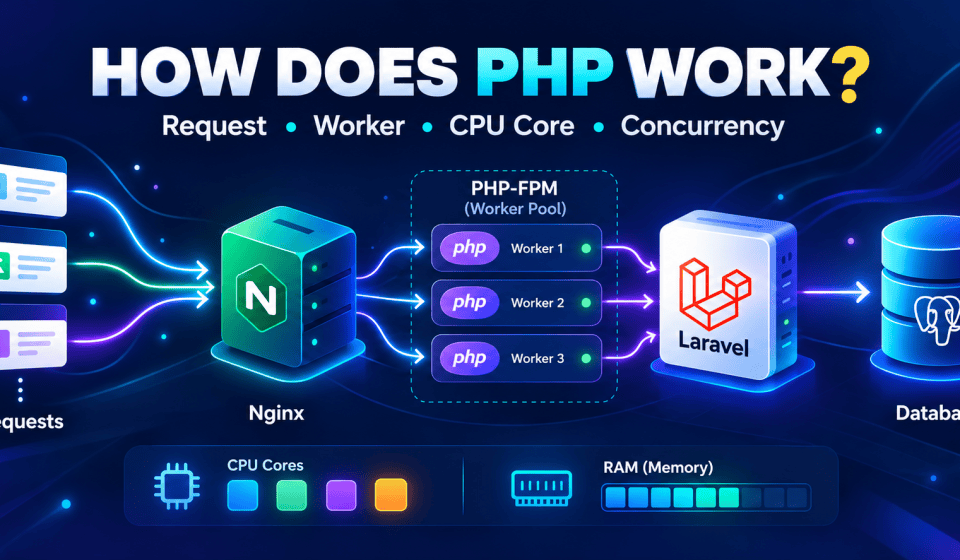
Client → Nginx → PHP-FPM → Laravel → Database → ResponseNginx receives the request first. If the request is for a static file such as an image, CSS, or JavaScript file, Nginx can often serve it directly.
If the request needs to be handled by the Laravel application, Nginx forwards it to PHP-FPM through FastCGI.
PHP-FPM stands for PHP FastCGI Process Manager. It normally maintains one master process and multiple worker processes:
PHP-FPM Master
→ Worker 1
→ Worker 2
→ Worker 3
→ Worker 4
The master process spawns, monitors, and recycles workers. The workers are the processes that actually execute PHP code.
How PHP Source Code Reaches the CPU
Consider this PHP code:
<?php
$a = 10;
$b = 20;

echo $a + $b;
The CPU does not understand PHP syntax directly. PHP’s Zend Engine tokenizes and parses the source code into an AST, or Abstract Syntax Tree. The compiler then turns the AST into internal instructions called opcodes.
The Zend Virtual Machine executes those opcodes:
PHP Source
→ Lexer (tokens)
→ Parser (AST)
→ Compiler (opcodes)
→ Zend VM
→ CPU
Where OPcache Fits In
In production, OPcache prevents PHP from compiling the same files from scratch on every request. Compiled opcodes can be stored in shared memory and reused by workers in the same FPM pool:
PHP File → OPcache → Existing Opcode → ExecutePHP 8 also introduced JIT, which can compile hot opcodes into native machine code. However, most Laravel applications spend much of their time waiting for databases, networks, Redis, APIs, and other I/O. JIT therefore tends to matter more for CPU-heavy code than for a typical database-backed Laravel request.
The PHP-FPM Worker Lifecycle
A PHP-FPM worker is a long-running process, but Laravel application state is generally request-scoped.
For every request, Laravel boots, builds the container, processes the request, and then discards that request’s state. The worker itself does not necessarily die. It becomes available to process another request.
Common PHP-FPM Process Manager Modes
pm = static
PHP-FPM always keeps exactly pm.max_children workers alive. This gives predictable behavior and can be a good choice for dedicated servers.
pm = dynamic
PHP-FPM starts with a certain number of workers and creates more as load increases. If too many workers remain idle, some are terminated.
pm = ondemand
Workers are created when requests arrive. If a worker stays idle longer than pm.process_idle_timeout, it is terminated. This saves memory, but traffic spikes can introduce worker-spawn latency.
Another useful setting is pm.max_requests. When configured, a worker restarts after handling a certain number of requests. This is a practical safeguard against slow memory leaks.
How PHP Handles Multiple Requests
Suppose PHP-FPM is configured with:
pm.max_children = 5That means PHP-FPM can have at most five workers processing requests at the same time:
Request A → Worker 1
Request B → Worker 2
Request C → Worker 3
Request D → Worker 4
Request E → Worker 5
Now Request F arrives. All five workers are busy, so Request F cannot immediately start executing PHP. It has to wait until a worker becomes available.
Where Does a Waiting Request Go?
It waits in the PHP-FPM listen socket backlog queue. The size of this queue is influenced by listen.backlog, which is also limited by operating-system settings such as net.core.somaxconn.
- 502 Bad Gateway: The backlog is full and Nginx cannot connect to PHP-FPM.
- 504 Gateway Timeout: The request waits too long or execution exceeds Nginx’s
fastcgi_read_timeout.
When all workers are constantly busy, PHP-FPM may also log warnings such as:
server reached pm.max_children settingThe important mental model is:
One PHP-FPM worker executes one request synchronously at a time. PHP-FPM achieves concurrency by running multiple worker processes.
PHP Workers vs CPU Cores
Suppose a server has:
4 physical CPU cores
8 logical threads
16 GB RAM
And PHP-FPM has 40 workers.
Having 40 workers does not mean you need 40 CPU cores. A PHP-FPM worker is an operating-system process. A CPU core is a physical execution resource. The operating-system scheduler decides which process gets CPU time at any given moment.
 8 → using CPU
10 → waiting for MySQL
 5 → waiting for Redis
 5 → waiting for an external API
12 → idle
This is why having more PHP workers than CPU cores is perfectly normal for many web applications.
CPU-Bound vs I/O-Bound Workloads
I/O-Bound Workloads
Examples include database queries, Redis calls, external APIs, file-system operations, and network calls.
Imagine a request takes 110ms in total:
PHP computation: 10ms
Database waiting: 100ms
The worker is occupied for 110ms, but the CPU was needed for only around 10ms. While that worker waits for the database, the CPU can execute another worker.
This is why an I/O-heavy application can benefit from having significantly more workers than CPU cores.
CPU-Bound Workloads
Examples include image processing, large PDF generation, heavy encryption, compression, and large data transformations.
These requests continuously need CPU. A four-core machine cannot magically execute 40 CPU-heavy requests in parallel just because PHP-FPM has 40 workers.
More workers do not create more CPU. They can instead spread the available CPU across more requests, increase memory usage, create additional cache pressure, and worsen latency.
That is why CPU-heavy workloads usually benefit from keeping concurrency closer to actual CPU capacity.
Physical Cores and Logical Threads
A CPU specification such as 4 cores / 8 threads means the operating system can schedule work on eight logical CPUs, but eight logical threads are not equivalent to eight physical cores.
PHP worker != CPU thread
A PHP-FPM worker is generally a single-threaded operating-system process. A CPU thread is a logical hardware execution unit. The operating system schedules many PHP worker processes across a smaller number of CPU cores and logical threads.
Why Heavy Work Should Move to Queues
Suppose one request needs to generate a PDF, send 100 emails, process images, and call several external APIs.
If all of that happens inside the HTTP request, one PHP worker remains occupied for a long time. As average request duration increases, more concurrent workers are needed to sustain the same throughput.
Laravel queues give us another option:
HTTP Request
→ PHP-FPM
→ Dispatch Job
→ Redis / Queue
→ Response
A separate queue worker then processes the job:
php artisan queue:workA Laravel queue worker is also a PHP process, but it differs from a typical PHP-FPM request worker in an important way: Laravel boots once and remains booted.
That changes the state model. Static properties, singletons, cached objects, and leaked memory can survive from one job to the next.
This is why Laravel provides options such as:
--max-jobs
--max-time
The same reason explains why deployments commonly run:
php artisan queue:restartHorizontal Scaling and Downstream Limits
If one server is not enough, traffic can be distributed across multiple application servers:
Load Balancer
→ Server A → 30 PHP workers
→ Server B → 30 PHP workers
→ Server C → 30 PHP workers
But downstream pressure multiplies too.
3 servers × 30 workers = up to 90 PHP workersIf every worker can open a database connection, the database may suddenly need to support close to 90 concurrent connections.
Horizontal scaling also means application state should not depend on one particular server. Sessions, caches, and uploaded files generally need shared infrastructure such as Redis, a shared database, or S3-compatible object storage.
PHP-FPM Metrics Worth Watching
PHP-FPM exposes useful statistics through its status page. A pool can be configured with:
pm.status_path = /fpm-status- listen queue: How many requests are currently waiting for a worker.
- max listen queue: The highest number of waiting requests since PHP-FPM started.
- max children reached: How many times PHP-FPM hit the maximum number of workers.
- active processes / idle processes: How many workers are currently busy or idle.
Another useful option is request_slowlog_timeout, which can help capture stack traces for slow requests and reveal where workers are spending their time.
A Practical Worker-Sizing Mental Model
1. Memory
How many workers can comfortably exist in RAM? Memory gives us a hard ceiling.
2. CPU
How much actual CPU time does each request consume, and how many cores are available?
3. I/O
If requests spend most of their time waiting for MySQL, Redis, or external APIs, more workers than CPU cores can help keep the CPU busy.
4. Downstream Capacity
Even if PHP can handle more requests concurrently, can the database, Redis, payment provider, and other services handle the same amount of concurrency?
5. Real Measurements
Load tests and PHP-FPM metrics tell us whether our theoretical calculations match what actually happens in production.
I now think of the PHP-FPM worker pool almost like a valve. It controls how much concurrency is allowed to enter the rest of the system.
The Bridge from PHP-FPM to Node.js
Once this PHP model became clearer, understanding the Node.js event loop became much easier.
Client → Nginx → PHP-FPM → LaravelNginx itself is event-driven. A small number of Nginx worker processes can manage many connections using event mechanisms such as epoll, without dedicating one blocking process to every connection.
So a typical PHP stack already combines two concurrency models:
- Nginx: An event-driven server that can cheaply manage many connections.
- PHP-FPM: A process pool where each active request gets its own blocking worker.
Node.js essentially brings the event-driven approach into the application runtime itself.
What About Laravel Octane, Swoole, and Fibers?
- Laravel Octane: Keeps Laravel booted in memory using servers such as Swoole, RoadRunner, or FrankenPHP.
- Swoole: Can use coroutines to support non-blocking I/O inside PHP processes.
- PHP Fibers: Provide language-level primitives that async libraries can build on.
But regardless of the implementation, PHP and Node.js are ultimately trying to answer the same question:
When many requests arrive at the same time, how can we use the available CPU and I/O resources as efficiently as possible?
A simplified version of the traditional PHP-FPM model is:
Give each active request its own process. If it has to wait, let the operating system run another process.
The Node.js model is closer to:
Keep application execution centered around an event loop. When one operation is waiting on I/O, continue processing other work instead of blocking the application thread.
Different execution models. Same underlying problem.
Frequently Asked Questions
Is PHP single-threaded?
A normal PHP-FPM worker generally executes one request synchronously in a single process. A production PHP application handles concurrency by running multiple workers.
Should PHP-FPM workers equal CPU cores?
Not necessarily. I/O-heavy applications often benefit from having more workers than CPU cores because many workers spend time waiting for databases, Redis, or external APIs.
What happens when all PHP-FPM workers are busy?
New requests wait in the PHP-FPM listen backlog until a worker becomes available. If queues fill or timeouts are exceeded, users may see 502 or 504 errors.
Why are Laravel queue workers different from PHP-FPM workers?
Queue workers are long-running PHP processes where Laravel stays booted across multiple jobs. Because application state can persist, queue workers need deliberate recycling and restart strategies.
Does adding more PHP workers always improve performance?
No. More workers can improve concurrency for I/O-heavy workloads, but too many can increase memory usage, database pressure, cache contention, and latency.